Now on iPhone & iPad

Focus on what
truly matters.

The task manager built on the Eisenhower Matrix. Capture everything in your Inbox, sort it by what's urgent and what's important, and keep the day in focus — right on your Home Screen.

Free download · iPhone & iPad · Requires iOS 26.1 or later
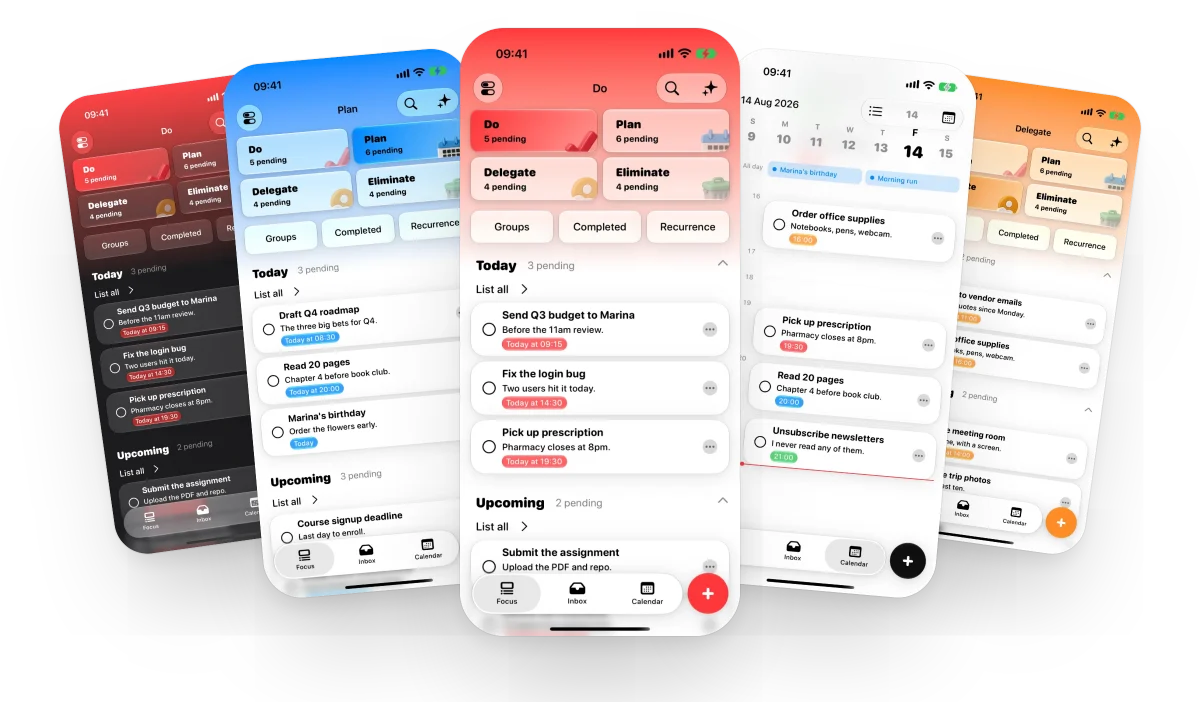
MinTask running on iPhone, showing the Eisenhower Matrix quadrants
🎯 Eisenhower Matrix 📥 Inbox capture ☑️ Subtasks 🔁 Recurring tasks ⏰ Alarms that ring on silent 🧩 Home & Lock Screen widgets 📅 Calendar & timeline 🎯 Eisenhower Matrix 📥 Inbox capture ☑️ Subtasks 🔁 Recurring tasks ⏰ Alarms that ring on silent 🧩 Home & Lock Screen widgets 📅 Calendar & timeline
🔍 Search with filters 🔔 Daily review reminder ✨ On-device intelligence 🗣 Siri & Shortcuts ☁️ Private iCloud sync 🖥 iPad-native 🔒 No tracking. No ads. 🌍 English · Español · Português 🔍 Search with filters 🔔 Daily review reminder ✨ On-device intelligence 🗣 Siri & Shortcuts ☁️ Private iCloud sync 🖥 iPad-native 🔒 No tracking. No ads. 🌍 English · Español · Português

Clarity by design

Urgent is not the same
as important.

Most apps just stack what's left to do. MinTask tells you what to do next — using the framework trusted by presidents, executives, and high achievers for decades.

The Method

Four quadrants.
Infinite clarity.

Every task lives in one of four quadrants — sorted by urgency and importance. So you always know exactly where to focus, and what to let go.

Quadrant 1

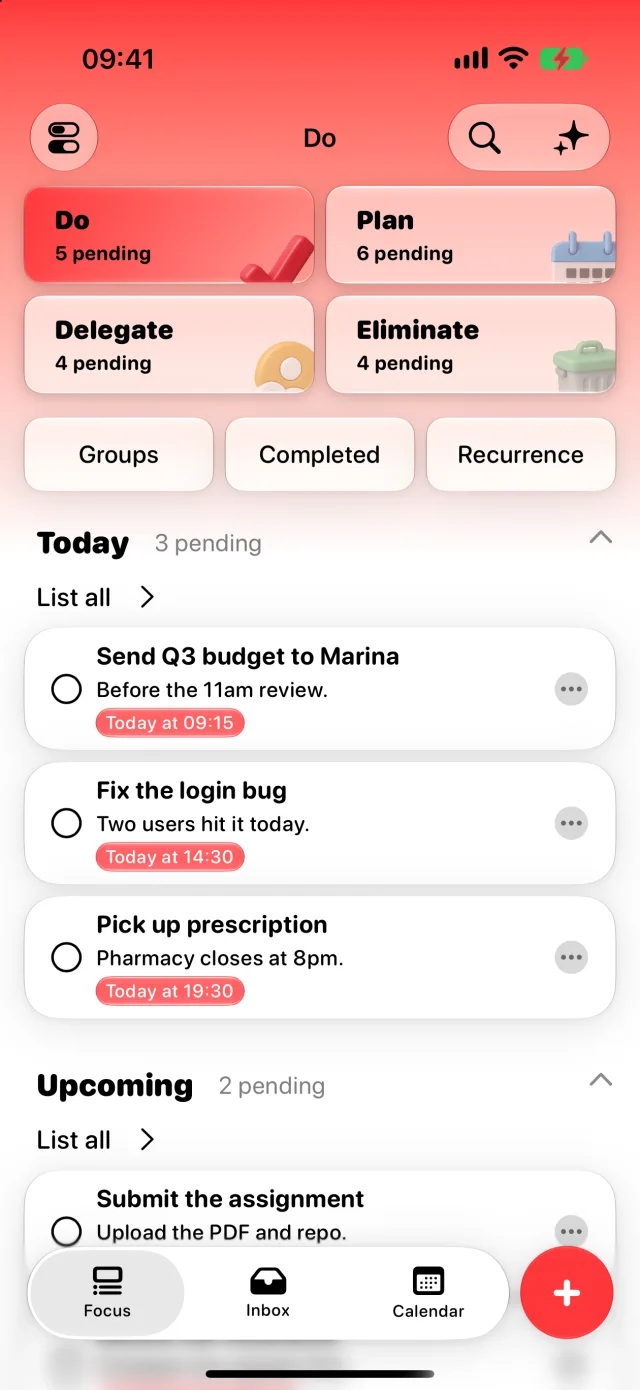
Do

Urgent · Important

Tackle these now. They drive real results.

Quadrant 2

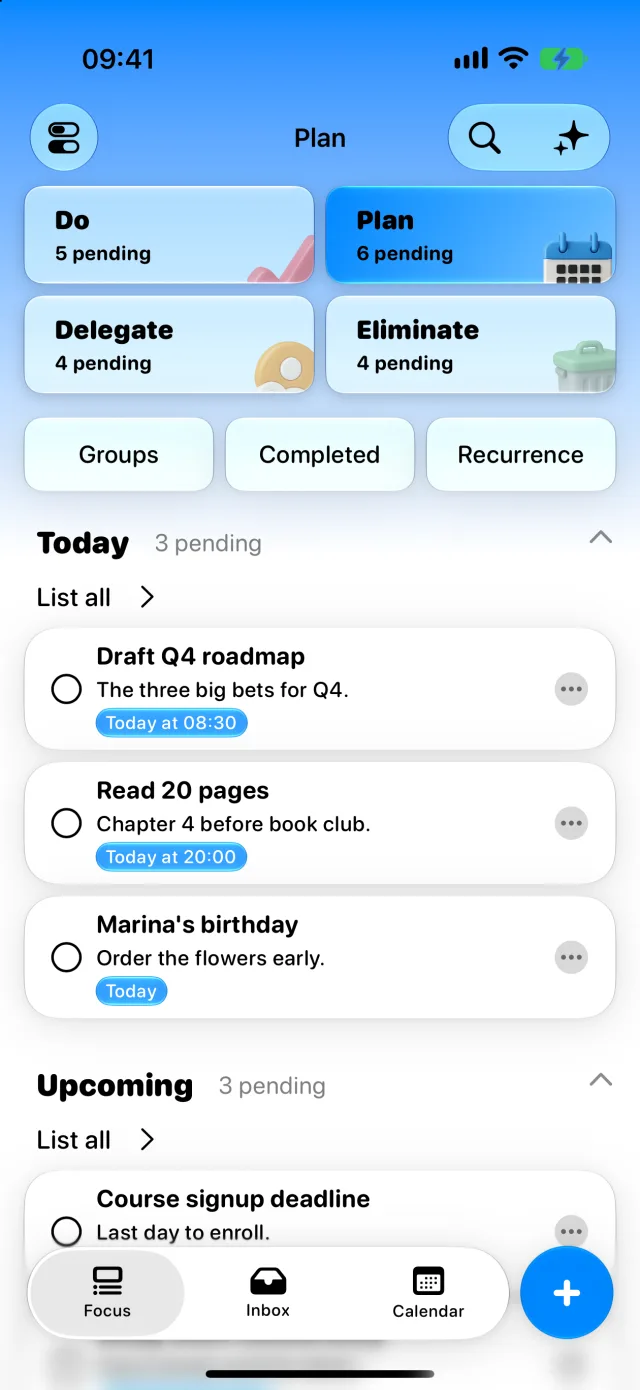
Plan

Important · Not Urgent

Schedule them so they never become emergencies.

Quadrant 3

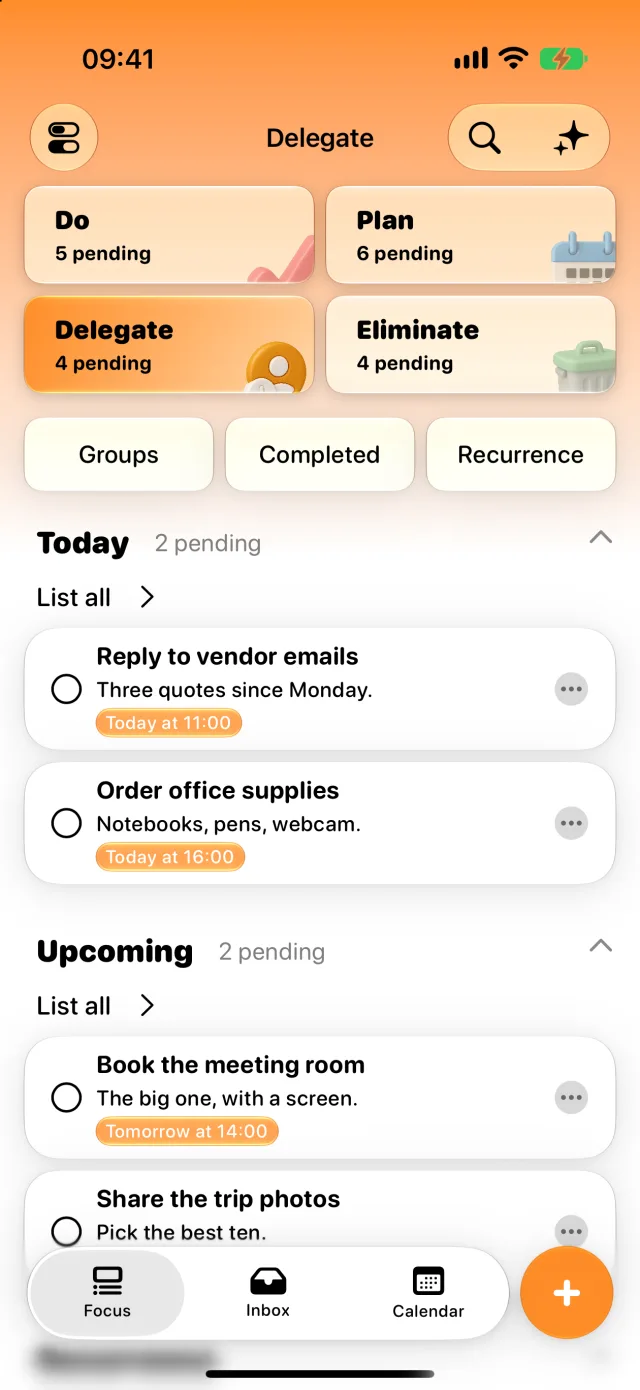
Delegate

Urgent · Not Important

Hand them off — they don't need you.

Quadrant 4

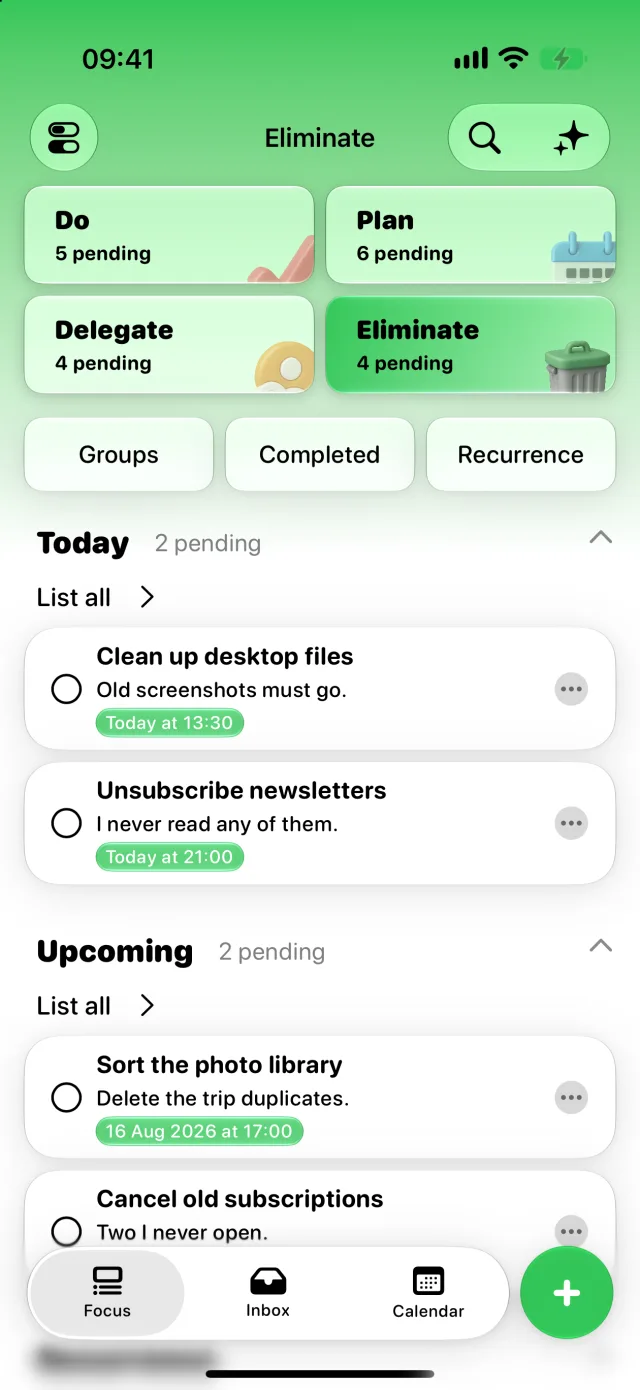
Eliminate

Not Urgent · Not Important

Free your mind. Let them go.

New to the method? MinTask includes a built-in guide that walks you through it.

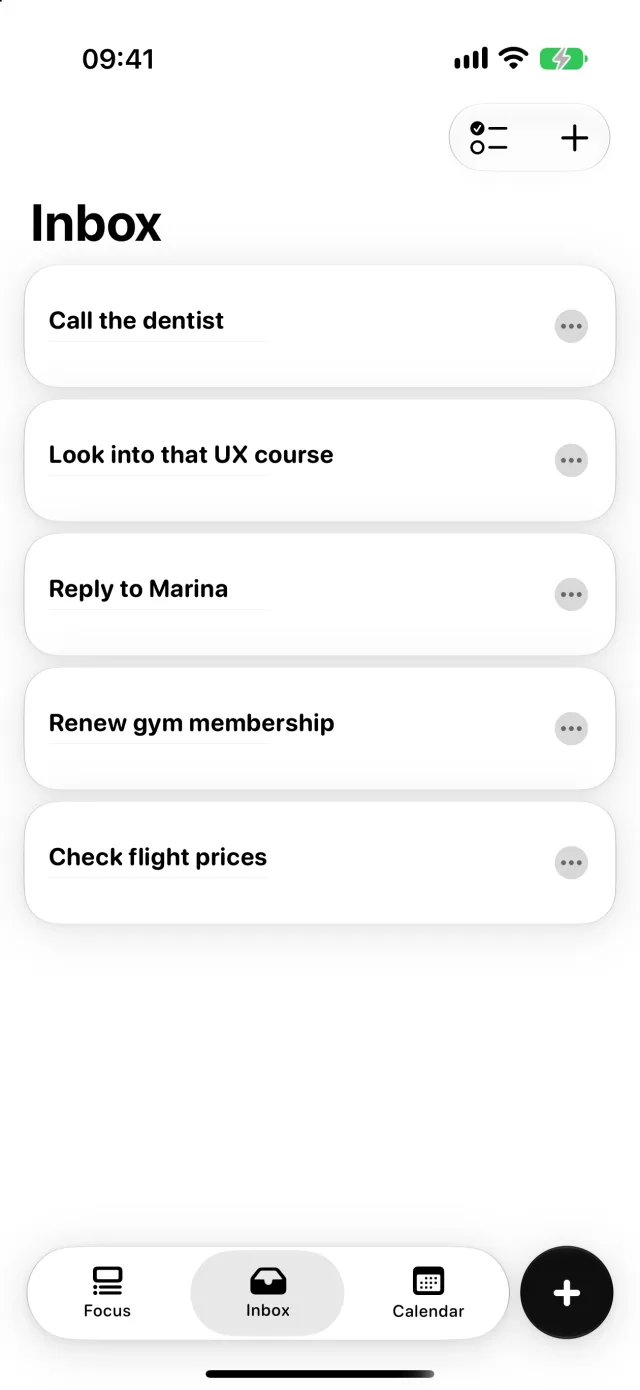
📥 Inbox

Capture quickly.
Organize better.

A thought shouldn't wait for you to decide where it belongs. Drop it in the Inbox in a second, then classify it when your head is clear — the way GTD was meant to work.

  • One-tap capture — no fields to fill, no friction
  • A guided flow to sort the Inbox into quadrants
  • Tasks in Plan move up to Do on their own as the due date closes in
  • Subtasks and notes live inside the task, never in another app
MinTask Inbox holding uncategorized captures

Made for real days.

Not the perfectly planned ones — the ones that change at 9:14 in the morning.

Do

Tackle what's
urgent and important.

Tasks that demand attention right now. MinTask surfaces them at the top — clear, focused, and impossible to overlook.

  • Reminders with the lead time you choose — an hour, a day, a week
  • Tap the notification to land straight on the task
  • One-tap completion with satisfying haptics
  • For what truly can't slip: real alarms that ring on silent
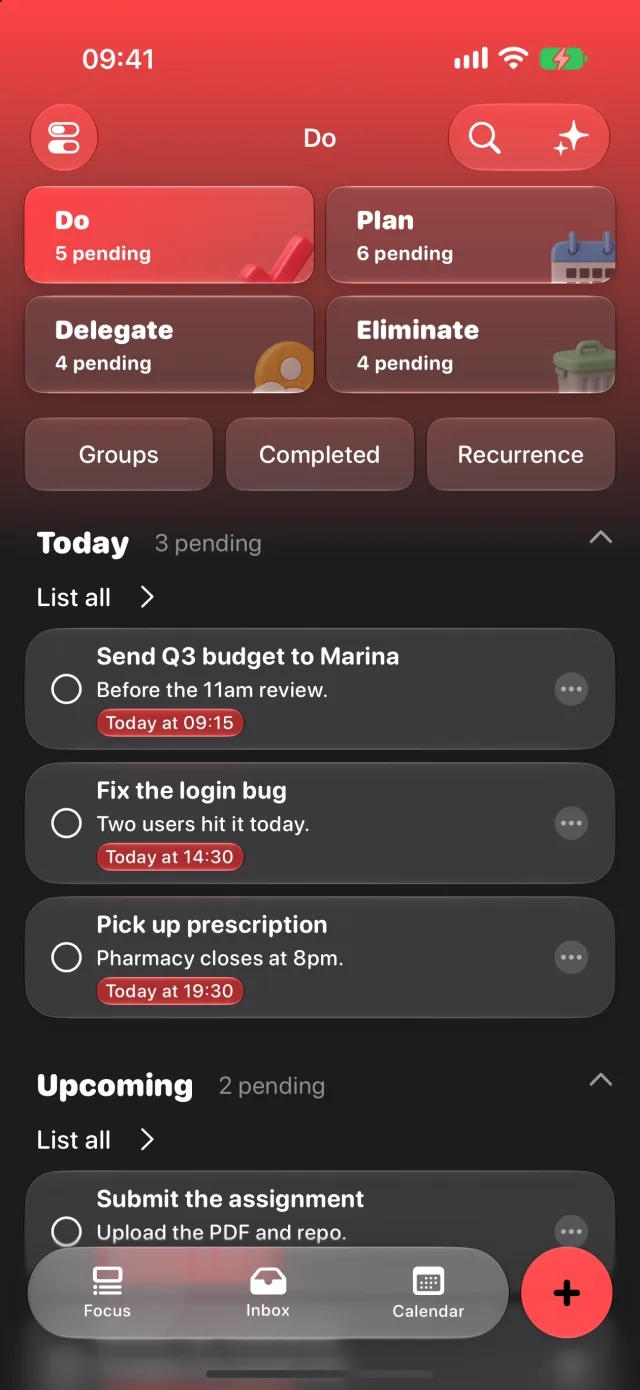
MinTask Do quadrant
MinTask Plan quadrant
Plan

Schedule what
truly matters.

The most important tasks rarely feel urgent — until it's too late. MinTask helps you give them the calendar space they deserve.

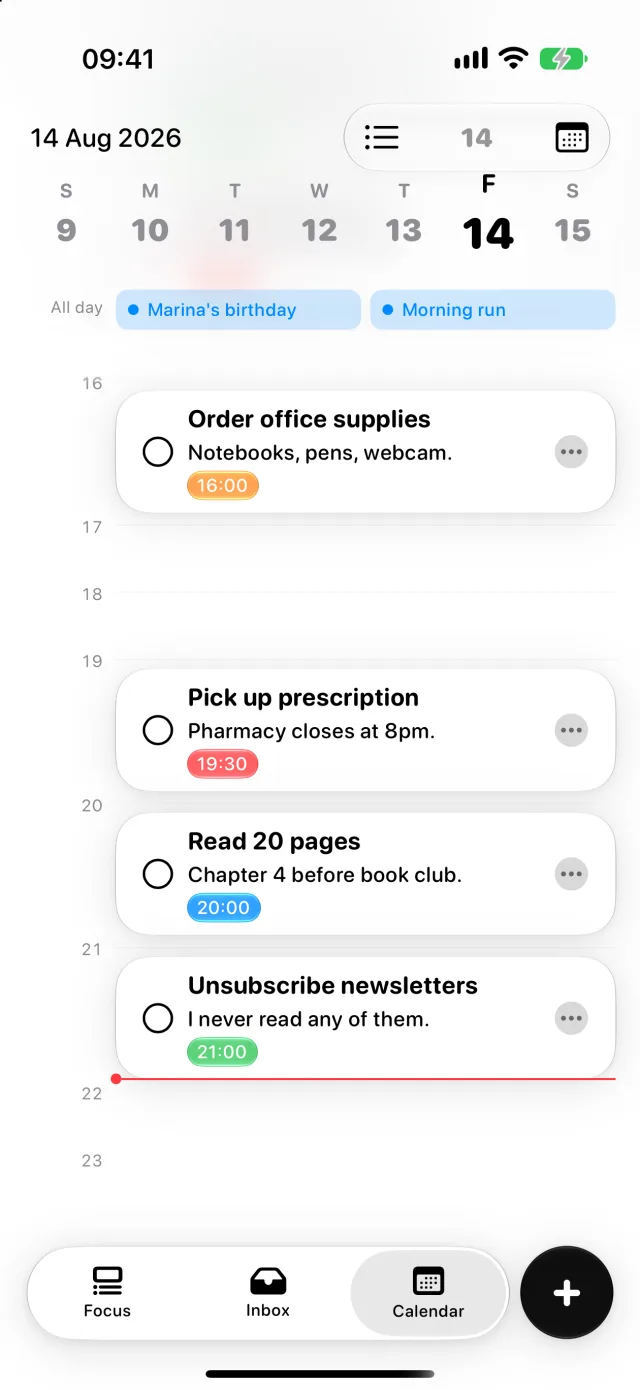
  • Calendar in list or timeline view, with an all-day header
  • Recurring tasks — daily, weekly or monthly — pause and resume anytime
  • A daily reminder that shows what's due, at the time you pick
  • Notes inside every task — context never gets lost
Delegate

Hand off what
others can do.

Urgent doesn't always mean yours. Spot what can be passed along, so your time stays on the work only you can do.

  • See at a glance what's eating your day
  • Drag tasks between quadrants as reality shifts
  • Make conscious choices — not reactive ones
MinTask Delegate quadrant
MinTask Eliminate quadrant
Eliminate

Free your mind from
noise.

Some tasks don't deserve your attention — they just steal it. MinTask gives you the courage to let them go.

  • Completed tasks archive themselves, automatically
  • Choose how long archives stick around — a week, a month, a year, forever
  • A focused space — never a cluttered one

Calendar

Your week,
without the guesswork.

MinTask calendar view
List view

Everything due, in order.

A clean reading of the day — what's due, what's next, what can wait until tomorrow.

Timeline view

See the shape of your day.

Switch to the timeline and your tasks lay out by hour, with all-day items pinned to the top. The gaps are as informative as the blocks.

Search

Find anything, instantly.

Full-text search across every task, with filters by priority and result counts — plus a pull-down search right on the home screen.

Everything you need

Powerful, when you
need it. Quiet, when you don't.

Every one of these is included free, with unlimited tasks.

☑️

Subtasks

Break the big thing into small ones and tick them off as you go.

📝

Notes inside tasks

Context lives where it belongs — attached to the task, with an optional preview on the row.

📅

Calendar, two ways

Read your schedule as a list or lay it out on a timeline — whichever fits the day.

🔁

Recurring on autopilot

Habits and routines set once and running themselves — pause them when life gets in the way.

🔔

Reminders that fit you

Per-task lead times, plus one daily nudge at the hour you choose. Notifications that nudge, never nag.

🔍

Search with filters

Full-text search across everything, narrowed by priority — right from the home screen.

📦

Archive that cleans itself

Completed tasks fade into an archive and disappear on the schedule you set.

📈

Urgency that escalates

Tasks in Plan move to Do on their own as the deadline approaches. Nothing quietly rots.

📚

Built-in Matrix guide

A short, friendly explainer on the method — always a tap away inside the app.

Why it works

“The list never got shorter.
So I stopped ranking it
by what shouted loudest.

Endless to-do lists fail for one reason: they treat every item as equal. The Eisenhower Matrix doesn't. It asks two questions — is this urgent, is this important — and the answer decides your next hour.

On iPad

Not a stretched
iPhone app.

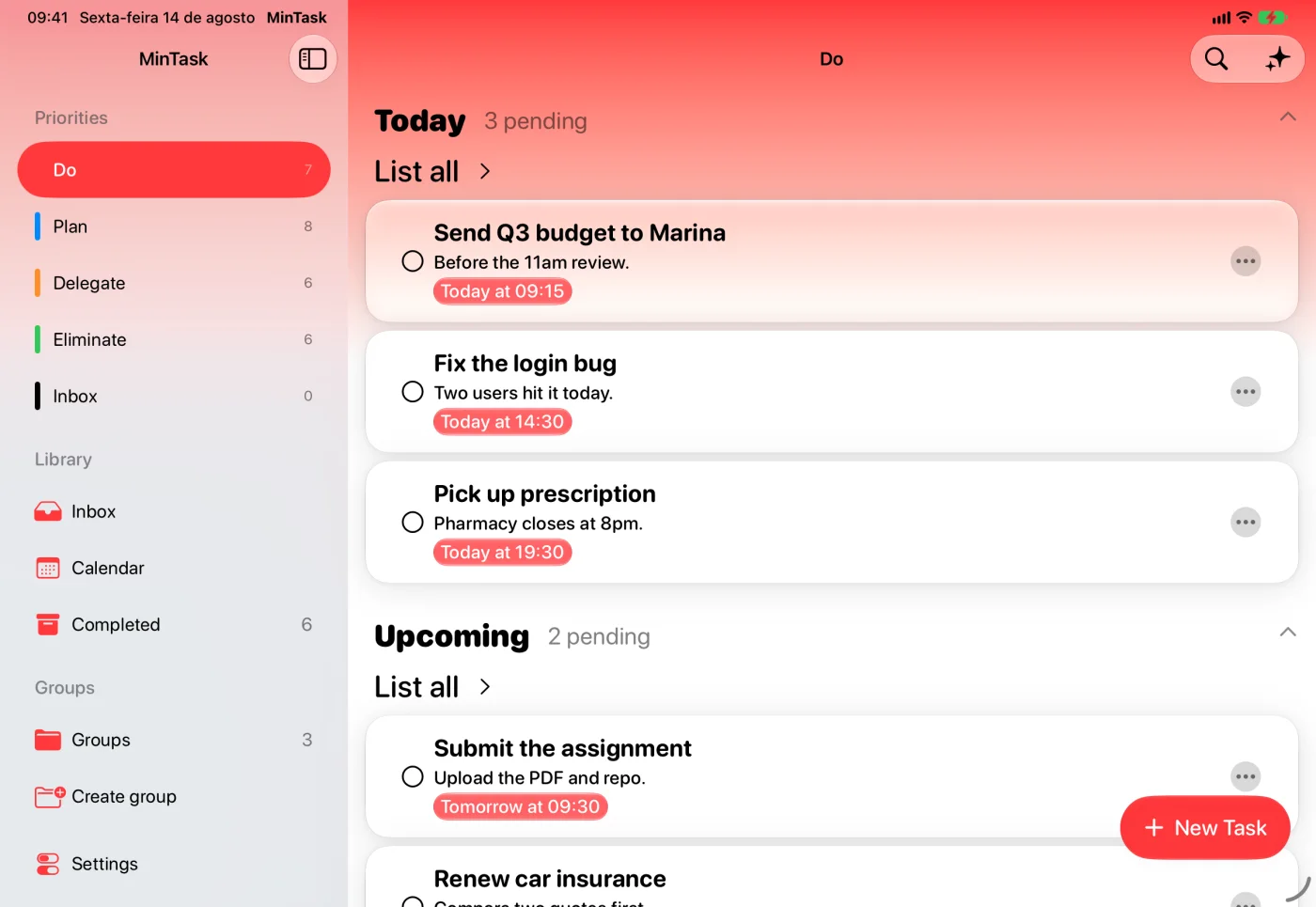
A real sidebar, multiple windows side by side, pointer support, and keyboard shortcuts wired into the menu bar. MinTask behaves like it was built for the bigger screen — because it was.

MinTask on iPad, showing the sidebar next to the Do quadrant
  • Sidebar navigation in regular width
  • Multiple windows, each keeping its own place
  • Pointer hover states throughout
  • An extra-large Home Screen widget made for iPad

Keyboard shortcuts

⌘N New task ⌘F Search ⌘1⌘2⌘3 Switch tabs ⌘, Settings ⌘? Matrix guide
MinTask in dark mode

Appearance

Easy on
the eyes.

Light, dark, or follow the system — MinTask adapts to the hour and the room you're in. Quadrant colors stay legible either way, and the haptics can be turned off if you prefer it quiet.

☀️ Light 🌙 Dark ⚙️ System 📳 Haptics on or off

MinTask PRO

For the days that
don't forgive.

Everything above stays free, forever. PRO adds the heavier machinery — for when a deadline truly cannot slip.

⏰ Alarms

It rings even with
the phone on silent.

A notification can be swiped away without thinking. An alarm can't. Mark a task as unmissable and MinTask fires a full-screen alarm at the moment it matters, with a Live Activity counting down beforehand.

⏰ Alarm · now
Send the quarterly report
Do · due today, 17:00
Stop Mark as done
🧩 Widgets

Focus, before you
even open the app.

Home Screen and Lock Screen widgets that show the one thing you should be doing next — and let you tick it off without opening anything. Configurable by quadrant or project, in every size including extra-large on iPad.

Tap a task in the widget to complete it — no app launch required.

✨ Apple Intelligence

A second opinion,
on your device.

Ask MinTask to sharpen a vague task and it suggests a clearer title, a fuller description, a realistic date, or a set of subtasks — with its reasoning. You accept field by field; nothing is rewritten behind your back.

  • “Presentation” becomes “Finish the Q3 results deck”
  • A coach that reads the quadrant you're staring at and tells you where to start
  • New tasks classified into the right quadrant automatically

Runs on Apple's on-device foundation models — your tasks never leave your iPhone. Available on devices that support Apple Intelligence.

🗣 Siri & Shortcuts

Hands full?
Just ask.

Create, reschedule, move between quadrants, or check something off without touching the screen. MinTask plugs into Siri and Shortcuts through Apple's own intents, and its tasks show up in Spotlight.

“Hey Siri, in MinTask create Send the report

“…add Buy bread for tomorrow at 9”

“…move Send the report to Plan”

“…mark this one as done”

Siri voice commands require iOS 27 or later. Everything else in MinTask works today.

🗂 Groups

One life, several
contexts.

Separate work, studies and personal life into unlimited groups — each with its own name, description and cover image, and its own Home Screen widget.

🎨 App icons

Make it yours
on the Home Screen.

A set of alternative app icons, so MinTask sits comfortably next to however you've arranged everything else.

Free vs PRO

Feature Free PRO
Unlimited tasks & the full Matrix
Inbox capture, subtasks & notes
Recurring tasks & reminders
Calendar, search & archive
Private iCloud sync
iPad sidebar & keyboard shortcuts
Alarms that ring on silent
Home & Lock Screen widgets
Groups & projects
Apple Intelligence features
Siri voice commands
Alternative app icons

PRO is available as a subscription or a one-time purchase, right inside the app.

iCloud Sync

One schedule.
Every Apple device.

Add a task on your iPhone in the morning, check it off on iPad at night. MinTask syncs privately through your own iCloud — no third-party servers, no accounts, no compromise. Offline changes catch up as soon as you're back.

iPhone ☁️ iCloud iPad

Privacy by Design

Your data.
Yours alone.

MinTask is built around Apple's privacy standards. There are no accounts to create. No analytics tracking you. No ads. Your tasks stay where they belong — with you.

☁️

Stays in your iCloud

Sync goes through your private iCloud account — never our servers, because there are none.

On-device intelligence

AI features run on Apple's on-device models. Your tasks are never sent to an external provider.

🧹

Automatic cleanup

Configure how long archived tasks stick around. The rest disappears, on your terms.

Take control of
your day.

Free to download. Free to use. Optional premium features when you need them. Available on iPhone and iPad, in English, Spanish and Portuguese.

Requires iOS 26.1 or later